

ViewBuilder Graphics Tool

BMS & Control Automated Logic Engineering Tools
ViewBuilder Graphics Tool
GRAPHICS TOOLS

ViewBuilder Graphics Tool

Intuitive graphical design for clear, interactive building system visualization
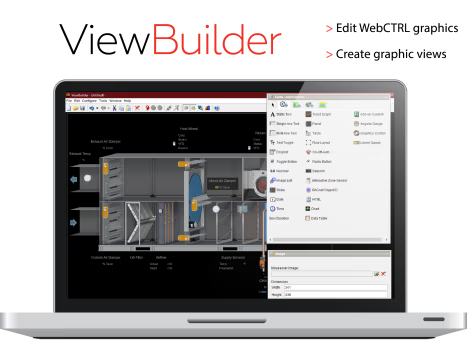
ViewBuilder® is a powerful graphics creation tool within WebCTRL® that enables users to design dynamic, interactive system graphics, helping operators quickly understand building performance, equipment status, and operating conditions.

ViewBuilder Graphics Tool

ViewBuilder is the tool used to create graphic pages for the WebCTRL building automation system. Building operators use these pages to monitor and control their building automation system. ViewBuilder comes with a graphics library for common applications or you can create your own from scratch.

ViewBuilder Graphics Tool

Drag‑and‑Drop Graphics Creation

Provides an intuitive drag‑and‑drop interface for creating custom system graphics without complex programming.

Interactive System Visualization

Enables development of interactive graphics that display live values, equipment states, alarms, and trends.

Reusable Graphic Components

Supports reusable graphic objects and templates, promoting consistency across multiple projects and systems.

Animations & Conditional Formatting

Supports animations, color changes, and conditional behaviors to visually highlight alarms, statuses, and system conditions.

Graphics Environment

Graphical design tool integrated directly within WebCTRL®
Supports vector‑based graphics for scalable, high‑quality visualization

System Compatibility

Compatible with WebCTRL® controllers, alarms, trends, schedules, and reports

Data Integration

Supports binding of:
Live system points
Alarm states
Status indicators
Trend data

Deployment

Graphics created in ViewBuilder® are instantly available within the WebCTRL® user interface once saved.

No Document updated.

What is the primary purpose of ViewBuilder®?

It allows users to create interactive, easy‑to‑understand graphics that visualize building systems and real‑time operational data.

Does ViewBuilder® require programming skills?

No. It is designed for ease of use with a graphical, drag‑and‑drop interface.

Can graphics be reused across different projects?

Yes. Graphic elements and layouts can be reused and standardized across projects.

Does ViewBuilder® support alarms and live data?

Yes. Graphics can display live values, alarm conditions, and animations tied to system behavior.

How Can We Help?

Have a question that doesn’t fit a specific category? Reach out to our team here for all other support
and information

    Become a Dealer

    Get directed to our Business Development team to start the authorization process and discuss sales support.

    Technical Assistance

    Get specialized help with system sizing, load
    calculation analysis, and technical data required for project design.

    Aftermarket Service

    Request support for warranty claims,
    scheduled maintenance, and genuine spare
    parts ordering.

    For more information : ahi@ahi-carrier.com