

FDD Reporting & Dashboards

BMS & Control Automated Logic Integration
FDD Reporting & Dashboards
SOFTWARE SOLUTIONS

FDD Reporting & Dashboards

Actionable fault insights and visual dashboards for proactive building maintenance
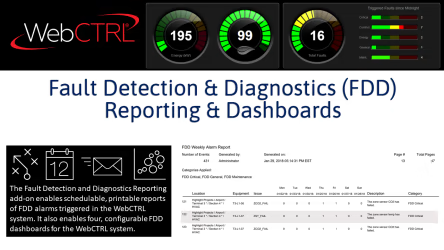
FDD Reporting & Dashboards enhance the WebCTRL® building automation system with automated fault detection, scheduled reporting, and configurable dashboards that help building teams identify, diagnose, and resolve equipment issues before they impact performance or comfort.

FDD Reporting & Dashboards

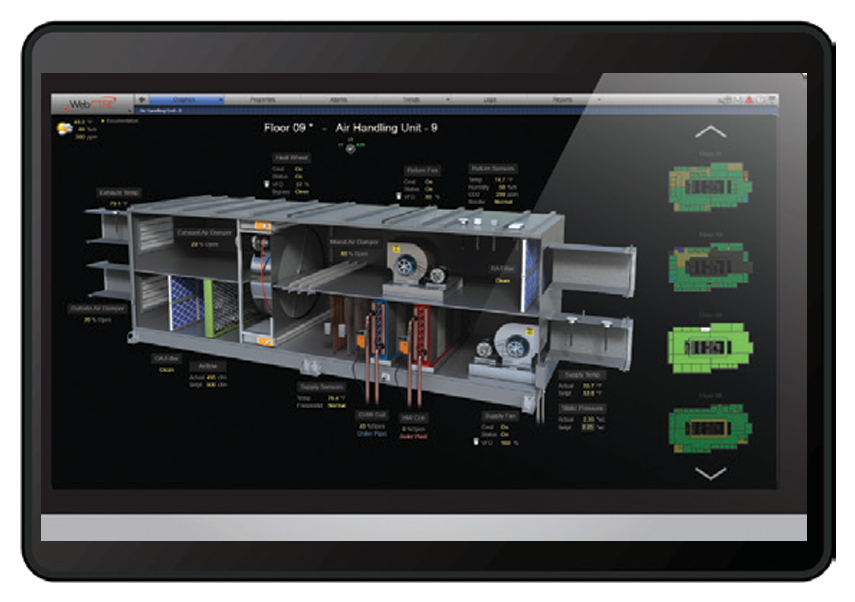
The Automated Logic Fault Detection and Diagnostics (FDD) library in the WebCTRL® system can pinpoint over 100 proven faults in typical HVAC equipment, including VAV systems, air handlers, fan coils, unit ventilators, water-source heat pumps, and air-source heat pumps.

Pre-programmed FDD algorithms are a standard feature of the WebCTRL building automation system and will alert building staff of potential equipment issues, help them identify the cause, and provide a visual display of preventive solutions. FDD can help reduce energy consumption, capital costs, and equipment wear and tear.

This add-on allows users to view FDD reports and dashboards that are reported by the WebCTRL system.

FDD Reporting & Dashboards

Pre‑Programmed Fault Detection Algorithms

Uses pre‑configured FDD algorithms to automatically alert building staff to potential equipment issues.

Automated FDD Reporting

Allows users to configure and schedule Fault Detection & Diagnostic reports delivered via email.

Configurable Distribution

Reports can be sent to selected recipients, supporting maintenance, operations, and management teams.

Multiple Report Formats

Supports report delivery in PDF and CSV formats, making data easy to review and analyze.

WebCTRL® Version Requirement

WebCTRL® v6.5 with the latest cumulative patch applied

Browser Requirements

Supported browsers:
Internet Explorer® v11
Google Chrome™ v44.0 or later

System Configuration Requirements

FDD logic must be added to control programs for fault detection to operate
Requires a purchased and downloaded Fault Detection & Diagnostics reporting license

Reporting & Viewing Requirements

Requires a PDF viewer (such as Adobe® Reader®) to view PDF reports

Document Name Description Document Type Language Action
Spec Sheet FDD Reporting & Dashboards Spec Sheet PDF English Download
What is the primary purpose of FDD Reporting & Dashboards?

It provides automated fault detection, scheduled reporting, and visual dashboards to help identify and resolve equipment issues early.

Do I need special programming to use FDD Reporting?

Yes. FDD logic must be implemented in the control programs for faults to be detected and reported.

Can FDD reports be scheduled automatically?

Yes. Reports can be scheduled and emailed automatically to selected recipients.

Is this feature suitable for preventive maintenance programs?

Yes. It is designed to support proactive diagnostics and preventive maintenance strategies.

Similar Products

How Can We Help?

Have a question that doesn’t fit a specific category? Reach out to our team here for all other support
and information

    Become a Dealer

    Get directed to our Business Development team to start the authorization process and discuss sales support.

    Technical Assistance

    Get specialized help with system sizing, load
    calculation analysis, and technical data required for project design.

    Aftermarket Service

    Request support for warranty claims,
    scheduled maintenance, and genuine spare
    parts ordering.

    For more information : ahi@ahi-carrier.com